Sending invoices to KSeF
Issuing an invoice and sending it to KSeF (Poland's National e‑Invoicing System) are two separate steps. You first create the document, then send it. There is no single call that creates and sends at once, and that is deliberate: it lets you create, review or validate a document before it becomes a legal e‑invoice.
The send is "instant" but it can finish asynchronously. The endpoint waits a short while for KSeF to accept the invoice; if KSeF needs longer, the call still returns success and the final result arrives a little later. So the important part is waiting for the outcome correctly, by polling the status endpoint or by consuming a webhook.
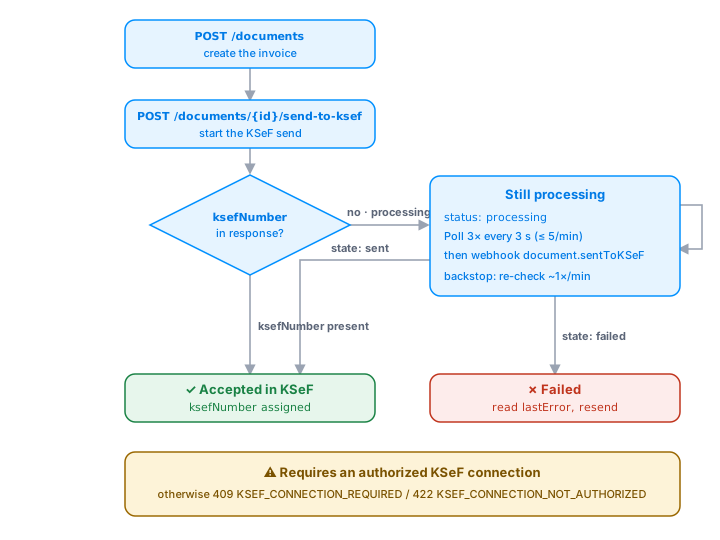
The flow at a glance
Before you start
- An authorized KSeF connection must be configured on the account (done in the app). Without it the send is rejected.
- Your token needs the scopes
documents:create(to create) anddocuments:send-to-ksef(to send). Polling needsdocuments:read. - The document must be a KSeF‑eligible type, for example
FakturaVAT. See Document types & amounts.
Test in the sandbox first — no legal effect. Before you send real invoices, rehearse the whole flow in the test environment (
https://sandbox.api.fakturnia.pl). It requires a test KSeF certificate: log in to a test entity in the Ministry of Finance test portalhttps://ap-test.ksef.mf.gov.pl/web/, generate a certificate, and connect it to your sandbox account. A production certificate will not work against the sandbox.
Optional: validate first. To catch problems before anything is saved, send the invoice body to
POST /documents/validate. It runs the full pipeline (numbering, totals, party resolution) and returns a preview without persisting, so you can show the user any validation errors up front. See Document types & amounts.
1. Create the invoice
A normal create. Nothing KSeF‑specific here.
curl -s -X POST https://prod.api.fakturnia.pl/external/v1/documents \
  -H "Authorization: Bearer $TOKEN" \
  -H "Content-Type: application/json" \
  -H "Idempotency-Key: $(uuidgen)" \
  -d '{ "documentType": "FakturaVAT", "issueDate": "2026-06-05", "buyerId": "681a…", "products": [ … ] }'
You get 201 with the new document.id. Keep it. Everything below uses that id.
The document's dates and terms go to the FA(3) XML like this:
| Document field | FA(3) element |
|---|---|
issuePlace |
P_1M (place of issue) |
subDate, subDateTo |
P_6 or OkresFa (P_6_Od, P_6_Do) |
paymentDeadlineDate, paymentDeadlineTerm |
TerminPlatnosci with Termin and TerminOpis |
paymentInstallments |
one TerminPlatnosci per instalment, the amounts in DodatkowyOpis |
advanceReceipts (advance invoice) |
ZaliczkaCzesciowa with P_6Z, P_15Z and KursWalutyZW for each receipt |
exchangeRate |
the rate on the lines; when it is missing, Fakturnia takes the NBP rate of the business day before the tax point when sending (a correction: the corrected invoice's rate) |
A date with a time becomes the day in Poland, and a date that cannot be read is a validation error instead of today's date.
Let the user review before sending. A document becomes final once it reaches KSeF, and fixing anything afterwards needs a formal correction (
FakturaKorygujaca). So between create and send it is worth showing the invoice to the user, for example its PDF, to confirm the data is right. Catching a wrong buyer NIP or amount now saves a correction later.
2. Send it to KSeF
curl -s -X POST https://prod.api.fakturnia.pl/external/v1/documents/{id}/send-to-ksef \
  -H "Authorization: Bearer $TOKEN" \
  -H "Idempotency-Key: $(uuidgen)"
Always pass an Idempotency-Key. If the connection drops while the send is in flight, you can safely retry the exact same request without risking a double submission. See Idempotency.
The endpoint returns 200 in two shapes. Branch on whether data.ksefNumber is present:
Accepted right away (KSeF answered within the wait window):
{
  "success": true,
  "data": {
    "ksefNumber": "1234567890-20260605-AABBCC-DD",
    "referenceNumber": "20260605…",
    "invoiceNumber": "1",
    "ordinalNumber": 1,
    "status": { "code": 200, "description": "…", "details": [] },
    "sessionReferenceNumber": "…",
    "hasUpo": true,
    "sendMode": "instant"
  },
  "executionTime": 8200
}
Still processing (KSeF is taking longer; the system finishes it in the background):
{
  "success": true,
  "message": "Sent to KSeF. Processing is taking longer than usual; the status will update automatically.",
  "data": {
    "status": "processing",
    "sendMode": "instant",
    "documentNumber": "FV/1/06/2026",
    "sessionReferenceNumber": "…",
    "invoiceReferenceNumber": "…"
  },
  "executionTime": 61000
}
When you get status: "processing", the invoice has been handed to KSeF. Do not resend it. Move to step 3 and wait for the final result.
When the send is refused
These come back before anything is sent, so they are safe to fix and retry:
| Status | Code | Meaning |
|---|---|---|
409 |
KSEF_CONNECTION_REQUIRED |
no KSeF connection configured on the account |
409 |
KSEF_ALREADY_PROCESSING |
a send for this document is already in flight |
409 |
KSEF_SEND_NOT_ALLOWED |
the document is not in a sendable state (already sent, wrong type, deleted) |
422 |
KSEF_CONNECTION_NOT_AUTHORIZED |
the KSeF connection exists but its token is invalid or expired |
400 |
VALIDATION_ERROR / BAD_REQUEST |
the document does not meet KSeF requirements |
3. Wait for the final result
The send response is not the end of the story when it says processing. The source of truth is the status endpoint. There are two ways to learn the outcome.
Option A — poll the status endpoint
curl -s https://prod.api.fakturnia.pl/external/v1/documents/{id}/ksef-status \
  -H "Authorization: Bearer $TOKEN"
{
  "success": true,
  "data": {
    "documentId": "681a…",
    "documentNumber": "FV/1/06/2026",
    "state": "sent",
    "ksefNumber": "1234567890-20260605-AABBCC-DD",
    "ksefReferenceNumber": "20260605…",
    "ksefStatus": { "code": 200, "description": "Accepted", "details": [] },
    "lastError": null,
    "sentAt": "2026-06-05T10:35:00.000Z",
    "processedAt": "2026-06-05T10:35:14.000Z",
    "updatedAt": "2026-06-05T10:35:14.000Z"
  }
}
state is the field to branch on:
state |
Meaning | What to do |
|---|---|---|
not_sent |
no send started yet | (you should not see this after step 2) |
processing |
handed to KSeF, awaiting acceptance | keep polling |
sent |
accepted; ksefNumber is set |
done, store ksefNumber |
failed |
KSeF rejected it; lastError is set |
read lastError, fix, resend |
Poll until state is sent or failed. Both are terminal. This endpoint is rate limited to 5 requests per minute, so poll roughly every 15 seconds, not faster, and give up after about 10 minutes. A processing send usually settles within seconds; if you need lower latency than a 15‑second poll, use the webhook below instead of polling harder. If you do exceed the limit you get 429 with a Retry-After header. Honor it.
async function waitForKsef(id: string, token: string, intervalMs = 15_000, timeoutMs = 600_000) {
  const deadline = Date.now() + timeoutMs;
  while (Date.now() < deadline) {
    const res = await fetch(`${API}/documents/${id}/ksef-status`, {
      headers: { Authorization: `Bearer ${token}` },
    });
    if (res.status === 429) {                                   // rate limited: wait it out
      const retry = Number(res.headers.get('Retry-After') ?? 15);
      await new Promise((r) => setTimeout(r, retry * 1000));
      continue;
    }
    const { data } = await res.json();
    if (data.state === 'sent')   return data.ksefNumber as string;
    if (data.state === 'failed') throw new Error(data.lastError?.message ?? 'KSeF rejected the invoice');
    await new Promise((r) => setTimeout(r, intervalMs));
  }
  throw new Error('Timed out waiting for KSeF');
}
Option B — subscribe to the webhook
Instead of polling, subscribe to document.sentToKSeF and document.ksefRejected. The first arrives when KSeF accepts the invoice (also when processing finished in the background), the second when it rejects it or the send fails (validation, timeout, lost session), so you never miss a rejection. It fires when the send completes, so you skip the polling overhead. See Webhooks for delivery format and signature verification.
When the event arrives, read the status endpoint to confirm the outcome rather than trusting the event alone: call GET /documents/{id}/ksef-status, check that state === 'sent', and take ksefNumber from there. If state is still processing, wait for the next event or fall back to polling. Webhooks can also be delayed or retried, so most integrations use the event as a trigger and keep polling as a backup.
A recommended pattern
You usually want the best of both worlds: a quick answer when KSeF is fast, and no busy‑polling when it is slow. Combine the burst and the webhook, and keep a safety net.
- Burst‑poll right after the send. Check the status endpoint up to 3 times, 3 seconds apart. Many sends finish in this window, and 3 checks stay well under the 5/min limit. If you get
sentorfailed, you are done. - Still
processing? Stop and hand off. Show the user that the invoice is being processed, stop polling, and wait for thedocument.sentToKSeFordocument.ksefRejectedwebhook to deliver the outcome. No busy loop, no rate‑limit pressure. - Keep a backstop. A webhook can be missed: your server was offline, mid‑deploy, or behind a network blip. So run a periodic job that re‑checks any document still in
processingand reconciles it from the status endpoint, for example once a minute. An invoice then never hangs waiting for a webhook that never arrives.
// 1. burst-poll for a fast result (max 3 checks, 3 s apart)
for (let i = 0; i < 3; i++) {
  const { state, ksefNumber } = await getKsefStatus(id, token);
  if (state === 'sent')   return ksefNumber;
  if (state === 'failed') throw new Error('KSeF rejected the invoice');
  await sleep(3000);
}
// 2. still processing: tell the user, then let the webhook resolve it
markProcessing(id);   // UI: "the invoice is being processed"
// 3. document.sentToKSeF (or the once-a-minute backstop) finishes the job later
The limit is per application, not per document. The status endpoint allows 5 requests per minute per application (API account), shared by every document, however many servers the application calls from. If your backstop may face more than a few processing invoices at once, throttle it: reconcile a handful per minute, space the calls out, and honor
429/Retry-After. The backstop is a safety net, not a fast path.
Handling a failure
When state is failed, lastError carries the KSeF code and message. A failed document is unlocked: because it carries a KSeF error, you can edit or delete it and send again. (A document that was accepted, or one still awaiting confirmation, is locked. See Deleting and editing documents.) Resend with a fresh Idempotency-Key, since it is a new attempt.
Putting it together
// 1. create the invoice
const created = await api.post('/documents', invoiceBody, { idempotencyKey: uuid() });
const id = created.data.document.id;

// 2. send to KSeF
const sent = await api.post(`/documents/${id}/send-to-ksef`, null, { idempotencyKey: uuid() });

// 3. resolve the outcome
let ksefNumber = sent.data.ksefNumber;        // present when accepted synchronously
if (!ksefNumber) {                            // otherwise data.status === 'processing'
  ksefNumber = await waitForKsef(id, token);  // poll until sent or failed
}
// ksefNumber is now the legal KSeF identifier of the invoice